
PowerA OPS v3 Pro Review
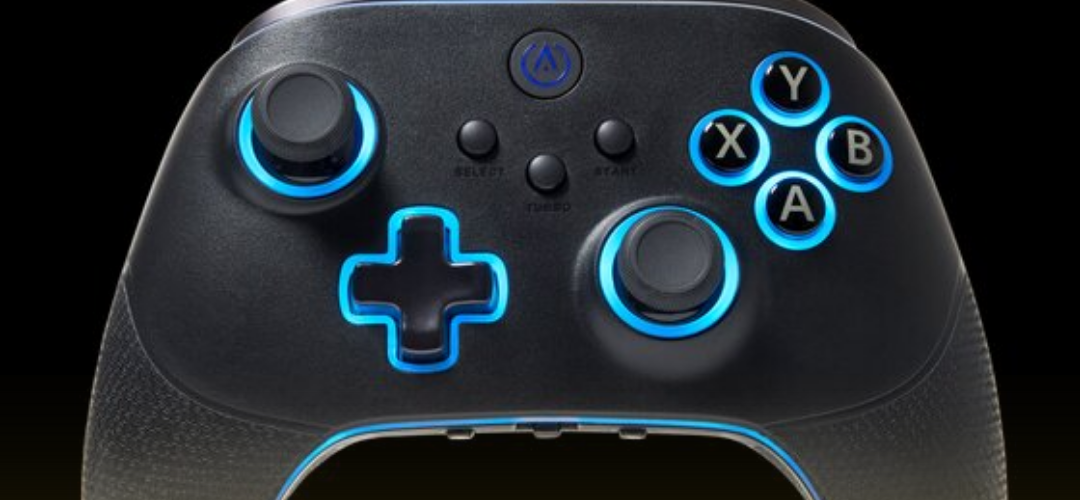
The PowerA OPS v3 Pro controller enters the market with the goal of offering a premium gaming experience without the hefty price tag associated with high-end controllers. Gamers looking for comfort, precision, and functionality at a lower price point will find much to appreciate here. While the controller excels in several areas, a few compromises might affect the experience for more demanding users. This article provides a detailed breakdown of the OPS v3 Pro’s design, performance, and value.
Design and Ergonomics: A Comfortable Fit
One of the first things noticeable about the OPS v3 Pro is the tactile feel of its buttons. The controller uses mechanical switch technology for the face buttons, D-pad, and shoulder buttons, delivering a satisfying “click” and responsive feedback with each press. This design decision makes it ideal for gamers who prefer a solid, responsive input, especially those who gravitate toward handheld consoles like the Nintendo Switch. The tactile response feels reminiscent of handheld gaming, offering a familiar sense of control and precision.
Additionally, the controller includes adjustable-height thumbsticks, allowing players to select between three different stick lengths to match their preferences. This feature enhances comfort by tailoring the experience to fit individual hand sizes. Anti-friction rings around the thumbsticks further enhance smooth movement, while Hall Effect sensors address the common issue of stick drift, adding durability to the build.
However, not everything about the design hits the mark. Six mappable buttons on the underside of the controller offer additional customization, but not all are ideally placed. Four of these buttons feel accessible, while two seem awkwardly positioned, making them difficult to use effectively during gameplay.
Connectivity Options and Compatibility
The OPS v3 Pro offers three connectivity modes: wired, 2.4GHz wireless, and Bluetooth. The 2.4GHz connection provides low-latency performance, ideal for competitive games that demand precision. Bluetooth compatibility increases the controller’s versatility, enabling users to connect it with various devices, such as Android consoles, Smart TVs, Apple TVs, and laptops. This flexibility makes the OPS v3 Pro a convenient choice for gamers who switch between platforms or enjoy gaming on the go.
Although connectivity performs well for the most part, the controller may present challenges when paired with certain Windows devices. During testing, the OPS v3 Pro struggled to connect seamlessly with the ROG Ally handheld, requiring time-consuming adjustments in software settings. Once configured correctly, the connection stabilized, but gamers who expect plug-and-play functionality might find the setup process frustrating. On Android devices, the Bluetooth pairing worked flawlessly without any troubleshooting.
Battery Life and Lumectra Lighting Features
PowerA’s official specification for the 1200mAh battery promises 30 hours of gameplay on a single charge. In real-world usage, the battery seems capable of surpassing this estimate under moderate gaming conditions, providing more than enough juice for extended play sessions. This extended battery life makes the OPS v3 Pro ideal for gamers who dislike frequent charging interruptions.
The controller also includes Lumectra lighting effects, adding a touch of flair to the gaming experience. While these lighting features contribute little to gameplay performance, they enhance the controller’s visual appeal, offering a customizable aesthetic for gamers who enjoy a bit of flair.
Performance in Gameplay: Where It Shines and Where It Falters
The OPS v3 Pro delivers a solid gaming experience, with the mechanical switch buttons offering fast, precise inputs that feel great during gameplay. The tactile feedback works particularly well for games that rely on quick reflexes or require extensive button pressing. Even for slower-paced or turn-based games, the mappable buttons provide useful shortcuts, such as assigning the screenshot function or menu navigation to easily accessible inputs.
However, the trigger locks fall short of expectations. The controller offers three trigger lock settings, but the lowest setting failed to register consistently during testing. Gamers who rely on fine-tuned trigger control for shooters or racing games might find this feature underwhelming. Although the other two trigger settings function adequately, the inconsistency in the lowest setting could frustrate players seeking precision.
Build Quality and Durability Concerns
The build quality of the OPS v3 Pro feels a step above entry-level controllers, though it doesn’t quite match the heft and solidity expected from premium-tier products. The controller weighs more than typical budget options, giving it a reassuring feel in hand, but some elements of the build leave room for improvement. Gamers accustomed to higher-end controllers might find the OPS v3 Pro slightly lacking in sturdiness, especially when compared to products from Xbox Elite or Sony DualSense Edge.
While the controller seems durable enough for regular use, it might not hold up well under aggressive handling or rage moments during competitive play. The materials feel robust, but they don’t exude the level of refinement found in more expensive options.
Value for Money: A Budget-Friendly Premium Option
The OPS v3 Pro offers a compelling package for gamers who want many of the features found in high-end controllers at a more affordable price. PowerA delivers an impressive mix of customization, comfort, and precision, all while keeping the cost lower than competitors in the premium category. The inclusion of mechanical switch buttons, adjustable thumbsticks, and versatile connectivity options adds significant value.
However, the controller’s compromises—including the lackluster trigger locks and occasional compatibility issues—may limit its appeal for some gamers. Serious enthusiasts or those focused on competitive play may still prefer more expensive alternatives. Despite these shortcomings, the OPS v3 Pro remains a strong contender in the budget premium category, making it an attractive option for gamers seeking functionality without overspending.
Final Thoughts: A Strong Option with Minor Flaws
The PowerA OPS v3 Pro controller stands out as a budget-friendly alternative to high-end gaming controllers. It offers a satisfying tactile feel, customizable buttons, and multiple connectivity options, making it suitable for a wide range of games and devices. The long battery life and stylish Lumectra lighting effects add further appeal, especially for gamers who appreciate both form and function.
However, technical glitches during setup on Windows platforms, along with underwhelming trigger locks, may deter some users. While the build quality feels adequate, it falls short of delivering the premium feel that gamers might expect from a controller marketed as “pro.” For those willing to overlook these minor issues, the OPS v3 Pro provides excellent value and an enjoyable gaming experience.
Ultimately, PowerA strikes a delicate balance with the OPS v3 Pro, delivering a feature-packed controller at an accessible price. Gamers who prioritize ergonomics and responsive inputs will find it a solid choice, especially for casual and mid-level competitive gaming. Though not without its flaws, the OPS v3 Pro proves that high-end features don’t always require a high-end price.